




Facebook is one of the most widely used platforms in the world — and one of the hardest to clean up once something goes wrong. Whether it’s a post you shared years ago or content someone else put on your timeline without asking, removing it is easier than most people think. Here’s how to delete a shared post on Facebook and reclaim control over what others see when they look you up.
When Facebook Posts Become a Problem
Being tagged in a photo you didn’t choose, or having someone post something on your timeline that you’d never have shared yourself — these situations are more common than people think. And because most posts default to public, anyone who visits your profile can see them.
The reality of social media is that you don’t control everything. What gets published about you — by you or by others — can reach far more people than you expect.
This matters beyond just embarrassment. Your online reputation is shaped by what appears publicly under your name. A photo from years ago, a post you once shared, or a comment someone left on your timeline can all influence how employers, clients, or strangers perceive you.

How to Delete a Shared Post on Facebook
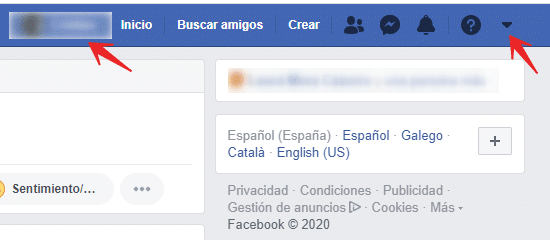
Start by going to your Activity Log.
There are two ways to get there:
- Click the downward arrow in the top-right corner of the page, select Settings & Privacy, and then click Activity Log, or
- Go to your profile, click the three dots just below your cover photo on the right, and select Archive.
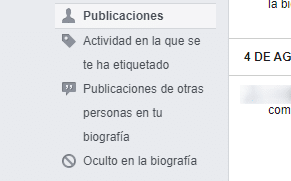
Once you’re in the Activity Log, you’ll see a set of filter options on the left side, as shown in the image above.
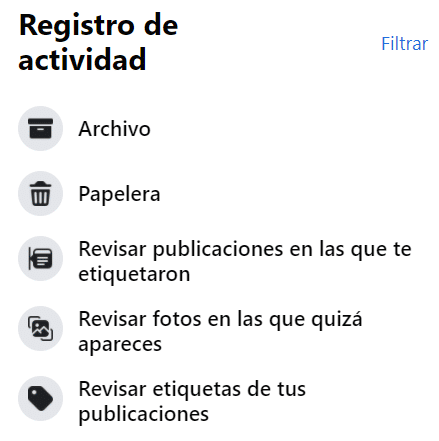
To delete one of your own posts, go to Posts and browse what you’ve shared. Click the pencil icon next to the post you want to remove and select Delete.
To remove posts that other people have made on your timeline, navigate to Posts from Others on Your Timeline. Find the post, click the pencil icon, and select Delete.
You can also delete posts directly from your Feed: find the post — whether it’s yours or shared by someone else — click the three horizontal dots in the top-right corner of that post, and select Delete.
Deleting a shared post on Facebook is straightforward once you know where to look. If something isn’t working as expected — a post that keeps reappearing, a tag you can’t remove, content that resurfaced in search — the questions below cover the most common scenarios.
Common Questions About Removing Facebook Posts
Can I delete a post that someone else shared from my profile?
No. If someone else shared your post to their own timeline, you cannot delete it from your end. You can only remove the original post from your own profile. If the shared version is harmful or violates your privacy, you can report it to Facebook or contact the person directly and ask them to take it down.
What happens when I delete a shared post — does it disappear everywhere?
Deleting a post from your profile removes it from your timeline and Activity Log. However, if others have shared or screenshotted it before you deleted it, those copies remain outside your control. The ICO (Information Commissioner’s Office) under UK GDPR acknowledges individuals’ rights to erasure, but platform-to-platform shares are difficult to fully retract once published.
I was tagged in a post I don’t want on my profile. How do I remove the tag?
Go to your Activity Log and filter by Posts You’re Tagged In. From there you can remove the tag — this unhides the post from your profile without deleting the original. If you want the post gone entirely and it violates Facebook’s policies, use the Report option to escalate it to the platform.
Is there a way to prevent others from posting on my timeline?
Yes. In Settings & Privacy → Settings → Profile and Tagging, you can restrict who can post on your timeline and require your approval before tagged posts appear. Setting this to “Only Me” or enabling the review option gives you full control before anything goes public.
What should I do if the post contains personal data I didn’t consent to sharing?
If the post includes personal data — your address, phone number, images used without consent — you may have a right to erasure under UK GDPR (Data Protection Act 2018). You can file a complaint with the ICO if Facebook fails to respond. For more complex situations involving defamation or image-based abuse, professional removal services like RepScan can assist with takedowns and legal escalation.
Can deleted Facebook posts still appear in Google search results?
Yes, for a period after deletion. Search engines cache content and may continue to show a post even after you’ve removed it from Facebook. You can request removal of outdated cached pages directly through Google Search Console. If the content is harmful and linked to your identity, a right to erasure request under UK GDPR (submitted to the ICO or directly to Google) may accelerate its removal from search results.

En RepScan se encarga de Growth y del ecosistema digital de la compañía (web y eshop). Escribe sobre reputación online, eliminación de contenido perjudicial y protección de la identidad digital de personas y empresas.
Ver perfil de LinkedIn